
TOPIC 6 TELEPHONE AND INTERNET
- Theme: Language in Use / Modern Communication
- Unit: Topic 6
- Sub-Topic Exactly as Listed: Sub-topic 6A: Telephone Services & Sub-topic 6B: Internet Services
- Syllabus Objectives Addressed:
- “The learner uses appropriate vocabulary and grammar structures to talk about telephone and internet services.”
- “Describes how to make telephone calls and send electronic messages.”
- “Reads and extracts information from telephone directories and web pages.”
- “Fills out forms and logs profiles related to digital communication.”
- Prerequisite Knowledge: Foundational knowledge of letter writing and postal communication from earlier topics, and basic familiarity with mobile phones or computer keyboards.
1. TOPIC INTRODUCTION
- Definition: Telephone and internet services comprise the modern digital infrastructure that allows individuals to transmit voice calls, text messages, data packets, and electronic documents instantaneously across local and global networks.
- Real-Life Relevance in Uganda: Telecom networks (like MTN, Airtel, and Uganda Telecom) and internet access allow people across Uganda to send mobile money, check UNEB results online using short SMS codes, stream educational materials, and stay in touch with relatives from Kampala to Kisoro without traveling.
- Hook Scenario: “Have you ever seen a parent tap a few buttons on a small smartphone screen, hold it to their ear, and immediately start talking to someone hundreds of kilometers away in another district? Or have you watched an older sibling check their school admission list on a computer connected to the world wide web? How does our voice travel instantly through thin air without any physical ropes or cables? Let us unlock the language of modern digital communication!”
─────────────────────────────────────────
2. LEARNING OBJECTIVES
─────────────────────────────────────────
By the end of this lesson, learners should be able to:
- Identify, define, and correctly spell vocabulary terms associated with telecommunication and internet usage.
- Construct accurate sentences utilizing the past conditional structure “…if…had…would have…” to discuss past digital communication events.
- Apply the structure “…enough…to…” to describe airtime, data bundles, and phone balance limitations.
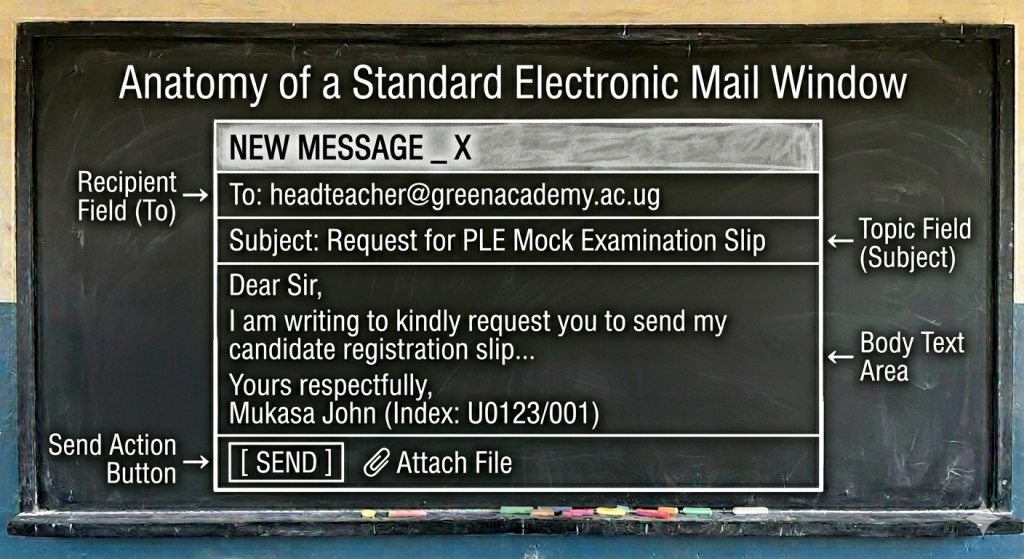
- Interpret information from a standard mobile phone contact directory or an email inbox interface.
─────────────────────────────────────────
3. KEY TERMS AND DEFINITIONS
─────────────────────────────────────────
- Airtime / Credit: The prepaid monetary value loaded onto a mobile phone account to pay for phone calls, text messages, or data bundles.
- Analogy: Airtime is like the fuel in a motorcycle (boda-boda); without it, your phone cannot make any outbound communication journeys.
- Data Bundle: A package of internet megabytes (MBs) or gigabytes (GBs) purchased to access websites, send emails, or use social platforms.
- Network Signal: The strength of radio waves received by a mobile device from local telecommunication transmission masts.
- Subscriber: A customer who registers a SIM card with a telecom provider to use their network services.
- Email (Electronic Mail): A digital message sent from one computer or smartphone user to another via an internet network.
- Website: A collection of connected web pages on the internet containing text, images, and information, accessible via a web address (URL).
─────────────────────────────────────────
4. DETAILED EXPLANATION OF CONCEPTS
─────────────────────────────────────────
Concept A: Telephone vs. Internet Protocols
Modern communication is divided into direct vocal channels and data-driven internet services:
- Telephone Operations: Involves dialing a unique phone number, recharging accounts with airtime scratch cards or mobile money, monitoring network bars for signal strength, and checking for a dial tone or busy signal.
- Internet Operations: Involves connecting a device to Wi-Fi or cellular networks, opening a web browser, entering keywords into a search engine, and managing an email account (with an Inbox for received mail and a Sent folder for outgoing mail).
Concept B: Language Structure — The Third Conditional (“…if…had…would have…”)
This structure is used to talk about an imaginary past situation that did not happen, and the past result that also did not happen. It explores regrets or missed opportunities.
- Formula: If + Subject + had + past participle verb, Subject + would have + past participle verb.
- Example 1: If the candidate had loaded airtime, she would have called her mother to check on her health. (Fact: She didn’t load airtime, so she didn’t call).
- Example 2: If Juma had connected his phone to the internet, he would have received the headteacher’s email on time.
Concept C: Language Structure — “…enough…to…”
This structure shows that a sufficient quantity or quality exists to perform a specific action. “Enough” is placed after adjectives but before nouns, and is followed by the infinitive “to” verb.
- Formula (with Noun): Subject + Verb + enough + Noun + to + base verb.
- Example 1: I have enough airtime to make a five-minute telephone call.
- Example 2: The internet speed was fast enough to download our P7 revision timetable.
Comparison Table: Communication Mediums
| Feature | SMS (Short Message Service) | Email (Electronic Mail) | Voice Call |
| Primary Media Type | Short text only (usually 160 characters). | Detailed text, files, and images. | Spoken audio. |
| Network Needed | Standard cellular network signal. | Active internet connection (Data/Wi-Fi). | Standard cellular network signal. |
| Cost Basis | Small flat fee per single message. | Deducts data bundles by package size. | Charged per second or per minute. |
─────────────────────────────────────────
5. TEACHER DEMONSTRATIONS / PRACTICAL ACTIVITIES
─────────────────────────────────────────
Activity: The Telephone Directory Scan Challenge
- Aim: To locate specific alphanumeric contact details quickly under timed conditions.
- Materials: A mock list of 10 names and phone numbers written randomly across the chalkboard.
- Procedure:
- Organize the class into two competitive teams: Team A and Team B.
- Call out a specific name: “Find the phone number for Inspector Okello!”
- A representative from each team must rush to the board, scan the list, and write down the target digits using the structure: “I have found enough information to write down Okello’s number.”
- Expected Observations: Pupils may look randomly instead of scanning alphabetically. Guide them to organize text into clear columns to increase lookup speed.
─────────────────────────────────────────
6. LEARNER ACTIVITIES
─────────────────────────────────────────
Classroom Activity 1: Inbox Analysis (Group Work)
- Objective: Read a digital message log and extract structural details.
- Task: Study the mock email notification text below and answer the inquiry questions:
From: support@uneb.ac.ug
Date: May 22, 2026, 10:15 AM
To: mukono_primary@school.ug
Subject: Notification of Digital Center Registration
Dear Center Supervisor, please be informed that your P7 candidate portal has been updated successfully. Ensure all index numbers are confirmed before Friday.
- Who is the sender of this electronic mail message?
- What should the Center Supervisor confirm before Friday?
- Construct a sentence using …if…had… explaining what would have happened if the school had checked their inbox on Saturday instead of Friday.
Classroom Activity 2: Structural Transformation Drill
- Objective: Change sentences perfectly using third conditional rules.
- Task: Rewrite the following sentences according to the instructions in brackets:
- I did not buy a data bundle. I did not access the educational website. (Combine beginning with: If I had…)
- The phone signal was weak. The call dropped mid-way. (Combine using: …if…had…)
- He has some credit. He can finish his digital research assignment. (Combine using: …enough…to…)
Formative Assessment
- Spelling Correction: Fix the broken digital terms: subscriba, airteem, websait.
- Grammar Fill: If the technician ____________ (repair) the phone mast yesterday, the network signal would have been excellent today.
- Application Essay: A pupil receives a text message stating: “You have won 5,000,000 shillings! Send 50,000 shillings airtime to this number to claim it.” Using your knowledge of telecom safety, write two advisory sentences explaining why this is a scam and what the pupil should do.
Marking Guide:
- Subscriber, Airtime, Website.
- had repaired (Ensure the past perfect tense is utilized correctly in the if clause).
- Award full marks for responses that identify the message as fraudulent and advise against sending money or airtime (e.g., The pupil should ignore the message because it is a scam.)
Further Reading
- Fountain Primary English Pupil’s Book 7, Pages 120-135.
- Mk Primary English Pupil’s Book 7, Unit 6: Telephone and Internet.
─────────────────────────────────────────
7. COMMON MISCONCEPTIONS
─────────────────────────────────────────
- Misconception: Mixing the tenses in the third conditional (e.g., “If I had airtime, I would call you”).
- Correction: That is the second conditional. The third conditional requires past perfect followed by a past conditional helper (“If I had had airtime, I would have called you”).
- Misconception: Believing that you can browse the internet without cellular data or a Wi-Fi connection as long as your phone battery is full.
- Correction: Clarify that battery power runs the device, but internet access requires a data subscription from a telecommunication service provider.
─────────────────────────────────────────
8. SUMMARY NOTES FOR PUPILS
─────────────────────────────────────────
- Technical Terms: Subscriber, Airtime, Data Bundle, Network Signal, Browser, Email, Website, Inbox, Search Engine.
- Third Conditional Rule: If + had + Past Participle $\rightarrow$ would have + Past Participle. (Used for past regrets).
- Quantifier Placement: Place enough before nouns (enough data) but after adjectives (fast enough).
─────────────────────────────────────────
9. EXAMINATION FOCUS (UNEB-Style)
─────────────────────────────────────────
a) Sentence Completion Questions
- The phone was ringing _________ nobody was inside the office to answer the call.
- Digital messages are sent much _________ (fast) than ordinary letters sent by post.
- Answers: 1. but, 2. faster
b) Sentence Transformation Questions (2 Marks Each)
- Moyo did not revise his vocabulary notes. He failed the online vocabulary quiz.
- Begin: If Moyo had…
- Answer: If Moyo had revised his vocabulary notes, he would not have failed the online vocabulary quiz.
c) Form / Diagram Interpretation Item
- Study the email template from Section 6.
- Question: Identify the specific label icon used when a sender wants to attach a scanned PLE passport photo document to an email.
- Answer: The Attachment / Paperclip icon (📎).
d) Composition / Dialogue Writing (10 Marks)
- Write a dialogue between a parent who wants to learn how to check their child’s final PLE results using an SMS shortcode on a mobile phone, and a tech-savvy primary seven pupil. The pupil must explain how to type the code, add the index number, check for enough airtime, and read the returning network message. Include at least 5 complete conversational turns per person.
─────────────────────────────────────────
10. HIGHER ORDER THINKING QUESTIONS
─────────────────────────────────────────
- Analyze: How does the introduction of mobile money through telephone networks change the way rural farmers sell their crops to buyers in faraway urban cities like Kampala?
- Evaluate: Weigh the advantages and disadvantages of using internet search engines for school homework research versus reading physical reference textbooks in a school library. Which method is more reliable, and why?
─────────────────────────────────────────
11. TEACHING TIPS
─────────────────────────────────────────
- Interactivity: Draw a mobile phone keypad on the floor with chalk. Have pupils jump onto the numbers or letters to “spell” a digital keyword like E-M-A-I-L while calling out its definition.
- Mnemonic Aid: Remember H.W.H. $\rightarrow$ Had + Would Have for Third Conditional success!
─────────────────────────────────────────
12. GLOSSARY
─────────────────────────────────────────
- Browser: A specialized software application used to locate, retrieve, and display content on the World Wide Web.
- Scam: A fraudulent, dishonest scheme performed by cybercriminals to steal money, airtime, or personal data from users.
- Transmit: To pass or send an electrical, vocal, or text signal from one place or person to another.
─────────────────────────────────────────
END: KEY TAKEAWAY FOR LEARNERS
─────────────────────────────────────────
Telephone and internet services have turned our world into a global community, allowing information to travel instantly across Uganda. By mastering the language of technology and learning structures like the third conditional, you prepare yourself to participate in this digital world. Always use internet tools safely and responsibly to build your education
 Introduction to Islamic Religious Education (IRE) – Senior Six Learner’s Guide
 PERFORMING ARTS SENIOR TWO LEARNERS’ GUIDEOrdinary Secondary level
 - PERFORMING ARTS SENIOR TWO TEACHERS’ GUIDEOrdinary Secondary level
 Introduction to Islamic Religious Education (IRE) – Senior Five Learners’ Guide
 NUTRITION AND FOOD TECHNOLOGY SENIOR TWO LEARNERS’ GUIDE
- NUTRITION AND FOOD TECHNOLOGY SENIOR TWO TEACHERS’ GUIDEOrdinary Secondary level
 MATHEMATICS SENIOR TWO LEARNERS’ GUIDEOrdinary Secondary level
 - MATHEMATICS SENIOR TWO TEACHERS’ GUIDEOrdinary Secondary level
 LITERATURE IN ENGLISH SENIOR TWO LEARNERS’ GUIDEOrdinary Secondary level
 - LITERATURE IN ENGLISH SENIOR TWO TEACHERS’ GUIDEOrdinary Secondary level
 Enjoy learning with Yaaka Digital NetworkUncategorized
 Why We Must Accelerate Digital Learning: A Shared Responsibility for Learners, Teachers, Schools, Development Partners and GovernmentUncategorized
 AD3: Three-Dimensional Arts: CarvingUncategorized
 AD3: Drawing and Painting: Still LifeUncategorized
 AD3: Drawing And Painting: PerspectiveUncategorized
- Enjoy learning with Yaaka Digital NetworkUncategorized
- Why We Must Accelerate Digital Learning: A Shared Responsibility for Learners, Teachers, Schools, Development Partners and GovernmentUncategorized
- AD3: Three-Dimensional Arts: CarvingUncategorized
- AD3: Drawing and Painting: Still LifeUncategorized
- AD3: Drawing And Painting: PerspectiveUncategorized
 AD3: Three-Dimensional Arts: Relief SculptureUncategorized
- Topic 2: Electricity and MagnetismUncategorized
- Topic 1: The Muscular-Skeletal SystemUncategorized
- TOPIC 4: ISLAMIC HISTORY AND MUSLIM ORGANISATIONS (UMSC/UMEA)Uncategorized
- TOPIC 3: FIQH (HIJJ AND FORBIDDEN PRACTICES)Uncategorized
Products
-
 Books & Novels
$ 79
Books & Novels
$ 79
-
Whole subject
$ 29
-
Ultimate Plus
$ 999
-
Ultimate
$ 299
-
Gold
$ 99

0 responses on "TELEPHONE AND INTERNET"